
Hey there, product managers! If you're looking to make smart decisions and keep everyone on the same page, understanding technical stuff is key. The OSI Model Playbook is here to help you do just that. It's packed with insights to help you talk tech with your engineering team, set realistic plans, and keep stakeholders happy. Plus, it shows you how to stay flexible, manage resources, and nail product success.
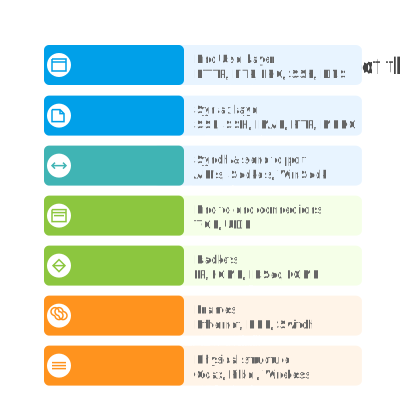
One of the big things you need to know is the OSI Model. It's a framework that helps you get how networks work. This article breaks down each layer so you can tackle tech challenges and align your plans with what engineering needs. From nailing the user experience at the Application Layer to picking the right network protocols, this playbook has got you covered. Let's dive into the OSI Framework and see how it can make your job a whole lot easier.
This comprehensive understanding helps product managers:
- Make informed technical decisions
- Communicate effectively with engineering teams
- Plan realistic roadmaps
- Manage stakeholder expectations
- Optimize resource allocation
- Ensure product success
7 - Application layer
Product managers should consider the Application Layer as the "user experience layer," where the product directly interacts with users and other applications. When users browse a web application, send emails, or transfer files, they are operating at this layer. Key considerations include selecting protocols such as HTTPS for secure web traffic, SMTP for email integration, or implementing APIs for third-party integrations. For example, in building a financial product, it is essential to ensure all communication uses HTTPS to protect sensitive data. The choice of protocols at this layer impacts user experience, security compliance, and integration capabilities with other services.
This is the layer where network applications communicate with each other. Common technologies include:
- HTTP/HTTPS: web surfing
- FTP: file transfer
- Email: SMTP
- Virtual terminals: Telnet
Implications for product management:
- User Interface
- Feature accessibility
- User experience design
- Platform compatibility
Protocol Support:
- HTTP/HTTPS implementation
- Email protocols
- Custom protocol needs
Application Features:
- Core functionality
- Integration capabilities
- Extension mechanisms
Example Decisions:
- Designing API endpoints
- Selecting communication protocols
- Planning feature implementations
6 - Presentation layer
The Presentation Layer acts as the "translator" and "formatter," managing data presentation, compression, and encryption. It affects user experience and security, important for product managers. For video streaming, compression choices impact quality and bandwidth. Encryption via SSL/TLS certificates ensures data protection and compliance.
Key Functions:
- Translation: Converts application data to machine-readable format.
- Compression: Crucial for video/audio streaming.
- Encryption: SSL certificates provide encryption.
Implications for Product Management:
- Data formatting and file support
- Character encoding for international markets
- Compression methods
- Security and encryption standards
- Certificate management
- Privacy requirements
- Integration with APIs and third-party compatibility
Example Decisions:
- Selecting file formats
- Choosing encryption standards
- Planning API versioning
5 - Session layer
The Session Layer functions as the "conversation manager" for a product, managing how users and applications maintain their connections. This layer is important for user experience and security features. It handles session tokens to keep users logged in, authentication processes, and user permissions management. When designing features such as "remember me," simultaneous user sessions, or role-based access control, considerations related to the Session Layer are involved. Key factors include session timeout policies, authentication methods (such as password, biometric, Single Sign-On), and authorization levels, all of which affect user experience and security stance.
Managing connections incorporates various APIs, such as NetBIOS, for tasks like server authentication via username and password, server authorization concerning user permissions, and overall session management.
Implications for Product Management:
User Authentication:
- Login mechanisms
- Session timeout policies
- Multi-factor authentication
State Management:
- Session persistence
- Recovery mechanisms
- Synchronization between devices
Security:
- Session encryption
- Token management
- Access control
Example Decisions:
- Designing login flows
- Setting session timeout policies
- Implementing multi-device synchronization
4 - Transport layer
Product managers should regard the Transport Layer as the "reliability versus speed decision layer." This is where critical decisions about data transmission are made, significantly impacting user experience. TCP provides reliable, ordered delivery, which is essential for features such as file downloads or financial transactions requiring high accuracy. In contrast, UDP offers faster but less reliable transmission, ideal for real-time applications like video calls or gaming where speed is more crucial than perfect accuracy. Understanding these transport layer trade-offs informs product decisions on performance and user experience, particularly when balancing real-time features against guaranteed delivery.
Key Functions:
- Segmentation: Sequence number, port number
- Flow Control: Ensuring compatibility of data handling capabilities
- Error Control: Preventing corrupted control
Transmission Protocols:
- TCP: Connection-oriented transmission, better for error control, suitable for multimedia, games, etc.
- UDP: Connectionless transmission, faster due to lack of feedback, suitable for real-time apps
Implications for Product Management:
- Reliability vs Speed:
- Use TCP for reliable data transfer.
- Use UDP for real-time applications.
- Performance Metrics:
- Response time requirements
- Throughput needs
- User Experience:
- Handling network interruptions
- Developing strategies for performance degradation
Example Decisions:
- Choosing protocols for video streaming features
- Setting up real-time communication features
3 - Network layer
The Network Layer handles global data routing, impacting decisions on product deployment, data center locations, and content delivery. Product managers need to understand IP addressing and routing when planning geographic expansion or region-specific features. This layer influences loading times, service availability, and user experience internationally.
Key Concepts:
- Logical addressing: IPv4 or IPv6
- Routing: OSPF, BGP, IS-IS
- Path determination
Product Management Implications:
- Global accessibility: IP addressing strategy, geographic service distribution
- Routing and performance: traffic management, load balancing
Example Decisions:
- Choosing cloud deployment regions
- Planning for IPv6 transition
2 - Data link layer
Think of the Data Link Layer as the "local traffic controller" for your product's data. For product managers, considerations at this layer are crucial when planning hardware requirements and assessing local network capabilities. MAC addresses and physical addressing become pertinent for implementing features such as device recognition, network access control, or IoT device management. A comprehensive understanding of this layer informs decisions regarding hardware compatibility, network security policies, and local network performance requirements for your product.
Physical Addressing
MAC Address: A 12-digit unique identifier assigned to network interfaces.
- Manages media access.
- Controls data transmission and reception from the media.
Implications for Product Management
Network Reliability
- Implement error detection and correction mechanisms.
- Define network stability requirements.
- Develop failover mechanisms to ensure continuity during outages.
Access Control
- Enable device discovery mechanisms for seamless connectivity.
- Set up network access permissions for secure communication.
- Manage hardware addressing for efficient data routing.
Performance Optimization
- Optimize frame size for efficient data transfer.
- Manage network congestion effectively.
- Define and implement Quality of Service (QoS) requirements to prioritize critical data flows.
Example Decisions
- Implement auto-switching between Wi-Fi networks to improve user experience.
- Design and set up device pairing mechanisms for streamlined connectivity.
- Develop network redundancy features to minimize downtime during failures.
1 - Physical Layer
The Physical Layer represents the actual hardware infrastructure that carries your product's data. For product managers, this entails making critical infrastructure decisions that impact cost, reliability, and performance. Important considerations include:
- Does your product require specific hardware specifications?
- What are the minimum network speed requirements for optimal performance?
- How will your product perform across various connection types (fiber, copper, wireless)?
Understanding the limitations of the physical layer is essential for setting realistic performance expectations and defining infrastructure requirements for your product.
Implications for Product Management
Connectivity Choices
- Wireless options (Wi-Fi, Bluetooth, cellular, NFC)
- Wired connections (USB, Ethernet, fiber)
- Impact on product form factor and design
Hardware Costs
- Component selection and bill of materials
- Manufacturing complexity
- Maintenance and replacement costs
Performance Characteristics
- Data transmission speeds
- Power consumption and battery life
- Physical range limitations
Example Decisions
- Choosing between Bluetooth 5.0 and 4.0 for a wearable device
- Deciding whether to include 5G capability in a mobile product
- Selecting appropriate ports for a laptop product
Practical Application
When designing and developing new technology products, there are numerous factors that must be considered to ensure optimal functionality and user satisfaction. Below are some key considerations and practical applications to guide your decision-making process:
- Start with user needs at Layer 7
- Work down through layers to understand implications
- Consider cross-layer impacts
- Balance technical requirements with business goals
- Plan for scalability and future needs
- Document dependencies and requirements
- Maintain flexibility for future changes